LXQt: Qt port of LXDE
LXQt, the “next-gen”, upcoming desktop environment, is the product of the combined efforts of the LXDE and the Razor-Qt teams. The output is, in terms of visuals rather similar to KDE, so those who enjoy KDE but find it highly-resource-consuming, LXQt might be just the thing for them. Since I never liked KDE much, I might not like this one at all.
LXQt is to become the default environment in the upcoming releases of Lubuntu which is probably for the best since as much as I like LXDE, it’s too simple for a general consumer to find normal. A simple example could be the trouble they’d have to simply getting the Battery Indicator to work for them (It refreshes slow and all. ) I know it was a lame example but its one of the things that piss me off whenever I use LXDE.
Plus the JetBrains’ tools dont work on any environment other than GNOME or KDE, but they might on this one…
The shortest distance between two points
Will always be a straight line
The Yahoo Notepad gets the new look
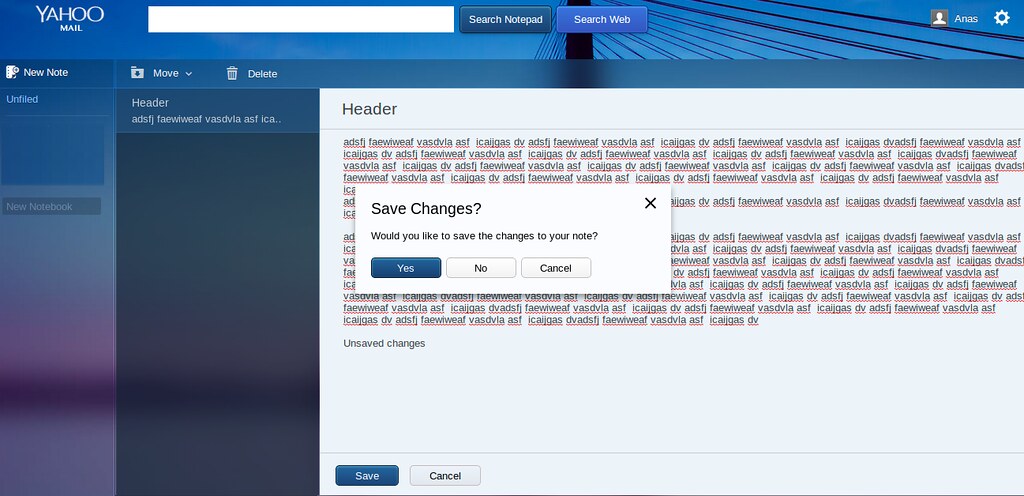 Yahoo Notepad, one of my personal favorites of such apps on the web, has recently been altered in terms of UI, and the new look, no doubt, and improvement, at least in terms of readability, greatly resembles or happens to be identical to yMail’s new theme. Also, there’s a change in the terminology (slight) and perhaps a feature or two has been introduced.
What used to be folders, are now called “notebooks”, and also, they’ve added a search bar, rather similar to the one they have on ymail. Only this one offers to actually search through all the notes. Other than that, the new UI is way more user-friendly than the older one. Creating, Modifying/saving, deleting notes and notebooks, every single one of these tasks were like slow and taxing in terms of UI back in the old interface. e.g. to rename or move or delete a folder or note you actually had to navigate to that one and then select stuff from menus e.t.c. but now, it has evolved to a slightly ‘straight-forward’ sort of UI, and yet sleeker. To create a new notebook, you simply have to type a name in the input box that says “create new notebook” , and press enter. To rename or delete notebooks, they’ve added a right-click context menu. Just move your cursor over to the notebook and right-click.
Another minor improvement is that whenever you are switching from one note to another and have made unsaved changes, it’s gonna prompt you and ask whether or not you are willing to save your work. Good, cause in the previous one, you can keep on switching from one note to another without realizing that all his work was being lost. A warning like this would do.
VWX
The W was developed for the V and is the precursor to X
Printing 2014 using a JS code free from numerals [Explanation]
Came across this thread on stack exchange. The challenge was to write a code, using whatever language you want, that would print the number 2014 to the console, without using a single numeral in the code. The person to post the code with the least number of characters wins.
After scrolling a whole lot over a number of Befunge codes and all, I came across a JS code, where the guy had said “Using pure-Math only..”, and he’d posted two codes, one used some type-conversion while the older version was like in plain JS. This:
m=Math;p=m.pow;t=true;++t+m.floor(p(m.exp(m.PI),t))*t*t++-p(++t,t--)/--t
Since the guy had written that the code was pure-math, I decided to give it a closer look.
As I was going to try it out, I opened another tab, and in the console, I pasted his code. It did really print out 2014, but how? It’s been ages since I even printed my own name in JS, so figuring out the code took me quite a while.
In the address bar i typed “data:text/html, <html contenteditable>” to make it editable, as i wanted to make notes while trying shit in the console.
So, the first thing I did was add a little whitespace to the code and make it slightly more presentable.The code is basically 4 lines, should i say? Notice the three semicolons? yes, they ensure that the code wont screw up if you give a line break right after the semicolon.
The first bit is “m=Math”. This the guy did simply to save space and perhaps for his own ease. Math.function() is the syntax for performing and implementing in your code various mathematical functions, rather like the Math module in Python. Followed by “p=m.pow”, and “t=true.” m.pow is his code’s version of Math.pow(x,y), which sets the index of parameter x to y, so Math.pow(2,3) would be equal to 2³. This too was merely to save space. The t = true could be confusing for some. That’s when JSs automatic type-conversion comes in handy, (True = 1; 0 = False). So “t-true” sets “t=1.”
Now the main expression:
++t+m.floor(p(m.exp(m.PI),t))*t*t++-p(++t,t--)/--t
The ++t sets the variable t= t+1. I’ts the same as t += 1 in Python. You might have noticed that the code also contains “t++“, so what’s the difference between the two?
t++ increases ‘t’ by 1, but does not implement therein. Means if the code is t=3; t++*3; The first bit set’s ‘t’ equal to 3, and in the second, t is multiplied by 3 while at the same time increased by one. ++t is slightly different. It increases and implements right then. So ++t*3 would result in 9 not 6.
Then the m.floor function is used to round off a number to the last integer. So 5.9 would become 5. Math.exp(a) results in 10ª, while Math.PI is a constant, which of course is equal to 3.141592653589793.
That’s pretty much all the functions explained. After starting with the very deepest bracket, and working my way out to the end, I ended up with the following expression that’s equal to ‘2014’, and is like a simplified version of the original code. this:
2+(1070*2-Math.pow(4,4)/2).
To see how I got there, here’s a copy of the page on which I was making all the notes.
FreeBSD install fails on VirtualBox [FIXED]
A known issue, faced by many, who at first usually blame themselves or the installation image, is that the installation process sort of ends of its own accord when extracting the archives, and after a reboot, it displays an error, the nature of which suggests that it failed to find files to boot.
Anyways, try enabling IO APIC from the system settings page. Might do the trick.
Your age on other planets
How old would you be if you were living on another planet?
Click here to find out.
Gates to Jobs when accused of theft
“Well, Steve, I think there’s more than one way of looking at it. I think it’s more like we both had this rich neighbor named Xerox and I broke into his house to steal the TV set and found out that you had already stolen it.”
Clink
I was browsing through dribbble (I dont really do that very often), when I came across this. Since the animation wasn’t really running well, I moved on to reading the description (response by the designer himself to be precise), at the bottom of which was a link to the “full-video.” I followed, but after watching only part of it, I again moved on to the description, and followed the link therin, and that’s when i fully understood what it all was about.
Clink is actually an app, that allows you to have drinks together, while not being together at all. Here’s an example, it’s your birthday, and you want to treat your friends to a drink. You’d open the app and send a clink to some bar (bars have to create clink accounts), that acts as a token, carrying details of whatever drink you are offering your friend, and of course you have to pay right-then too, using PayPal.
Though I myself might never use it, I do really appreciate the developers for their effort. The idea or concept behind the project isn’t bad either, and especially, nowadays when the birthday-guy has to treat the wishers (or they’d force him into doing so; no escape), this might come in handy..
10 “Must-have” Android apps for general consumers
Title says it all, and here they are:
- Lightning Launcher: First things first. Not many android users, especially those dealing with the older versions of HTC sense are content with the default UI. Common replacements are the GO Launcher, and Apex. But the thing with these two is that they can take up a nice amount of memory, especially GO launcher. On phones with high-specs, this may go un-noticed, but even on Dual-cores, the GO Launcher can cause a visible lag. To avoid this, for users that want naught but productivity, Lightning Launcher is a great option. It’s damn light, (at times it may take not more than just 2MB!) It’s extremely simple yet very customizeable, and once you get the hang of it, you can adjust it exactly to suit your requirements, but on the minus side, setting up, and getting used to it can be taxing and time consuming. In my opinion, lightning launcher is to android what lxde is to ubuntu. For those who prefer a more user-friendly, and slightly-less-bland, yet damn-light UI, they can go for Smart Launcher.
- Smart Launcher: In terms of weight, this ones my second favorite, and currently my primary launcher application. Smart Launcher is, in terms of design, a bit different. The home screen is more like a lock-screen sort of design, the top half of which can be dedicated to a widget (it features a clock by default), and the lower part can hold a virtually unlimited amount of icons dedicated to applications and shortcuts. Swiping from the edge, or pressing the menu button, or touching the menu icon, all would take you to the App Drawer, where the apps are all sorted into categories (and you are free to move them from one categ. to another.) That’s pretty much it. It’s pretty much customizeable too. You can alter the home-screen icons to a number of presets, and you can also apply themes and icon-packs.
- Aptoide: Aptoide is a store-of-stores. Especially on Devices that don’t support the Play-Store, Aptiode comes real handy. It’s like a portal where people can create their own stores and upload applications, but that was the developer side. For general consumers, aptoide works great for searching for and installing applications not available on the playstore, or those that aren’t really free. Just try once, and you’d know. It has to be manually downloaded and installed. Available for Download at aptoide.com
- Astro and ES File Explorer: Rivals, and since i never explored the former much, I cannot say which one’s better but in terms of personal preference, ES is. ES is user-friendly and simply packed with features. And has a clean user-friendly interface. You can use it to access files over FTP, Bluetooth, LAN, and of course you can add your SKydrive, U1, and other cloud accounts. Has an inbuilt App Manager, Download Manager and other usuals. However, the one thing it doesnt have and Astro does is a cool, proper Task Manager. It is however available as an independent app called the ES Task Manager, but I never liked it much. Astro also offers integration for your Facebook account, but it’s the interface of Astro which I just couldn’t get myself to like. Nevertheless I keep both.
- Kingsoft Office: Documents to Go, and Office Suite Pro aren’t exactly free, and buying such stuff for mobile devices might not exactly be a very cost effective solution for users who don’t really need to use these apps much, and to be honest, i never ever used the full version of either. Kingsoft office offers a Writer, a presentation tool, and a spreadsheet, and that is pretty much all one might need on a mobile device. Not really low on formatting features either, so for a general user, Kingsoft Office won’t be a bad choice. It’s pretty user friendly too.
- Inkpad Notepad: A simpler alternative to Evernote. Inkpad notepad is a plain notepad, which kinda resembles the iOS notes app in terms of design. All your notes are synced to inkpadnotepad.com. Free version only allows upto four syncs per day, and this could be irritating for some users, and especially when it keeps on notifying you with every sync. Still for a general user, not a bad choice, since Evernote can take some time getting used to.
- Myscript Calculator: Is a fun, and useful application which allows you to write mathematical expressions as you would on paper, and solves them. Does support all the functions your default calculator app does, and only provides an easier way to interact and avoid confusion.
- Clean Master and All-In-One-Toolbox: Both are great Optimizers. Clean Master offers an easy to use interface, while the latter might offer an extra tool or two. Both have a one-touch-memory-boost button, and both offer widgets for the home-screen. A bonus feature of Clean-master’s is that it adds a button to your default launchers homescreen after the first boost. Both offer junk, history and AppData cleaners, and App Managers. All-in-one-toolbox however offers a number of features that clean-master doesnt, like an inbuilt file-manager, Cache Cleaner, Apk managers, startup apps e.t.c.
- PicsArt: The best photo-editor available for Android. Has everything one might need, but the feature that I really like is the Draw mode, which sort of is a mini version of PS running in your mobile complete with support for Layers.
- Offline English Dictionary by Livio: The best Dictionary app available for Android. The definitions are from Wiktionary, but this one works offline.